MT5 risk manager and trading journal for beginner tradersSet the rule.
Then trade.
Positions that are too big, no daily limit, one more bigger trade after a loss: these are typical early mistakes. ProRisk Manager works out your position size in MetaTrader 5 (MT5) from the risk % you choose. At the daily limit you set, it locks its panel and can close all positions.
Trading with leverage is risky: you can lose the money you put in, and with some brokers more than that. ProRisk Manager helps you stick to your own rules. It does not prevent losses, will not make you profitable and does not replace knowledge or a strategy. Not financial advice.
Try it in your browser
Grab the red line. Watch the lot size.
The red line is your stop loss, the price at which a losing trade should close. The lot is the size of your position. This is the same math the panel runs in MT5. Example: EURUSD, $10,000 account, risk 1% of account value (equity).
Panel shows → Lot: 0.45455 | SL: 22.0
Wider stop, smaller lot. Risk stays $100. Orders round down to the broker's lot step.
The most expensive trade is often the one after a loss.
Two examples of the same bad morning. In the second one, position size and daily limit are fixed before the first trade.
Without a hard limit
Example · $5,000 account · plan: max 5% a day- 09:32EURUSD long, lot sized by feel−$95
- 10:05“Win it back”: double size−$120
- 10:41One more−$50
With ProRisk Manager
1% per trade · EA limit 3%- 09:32Lot calculated from the SL line−$50
- 10:05Same 1%, no “double size”−$50
- 10:41Limit reached → auto-close closes everything−$50
- 10:58Frustration trade via the panellocked
Illustrative example, not a result. Money is lost in the second example too. The EA only closes positions if you have switched on auto-close. It cannot prevent slippage (a fill at a worse price), price gaps or orders placed directly in MT5.
Now with your numbers
Pick your account, risk and stop. This is how the panel works out your position size.
With a 3% daily limit, today stops at a $150 loss. You choose that number yourself.
That is 3 full losses at 1% before the panel locks for the day.
Approximation: EURUSD, $10 per pip per standard lot, rounded down to 0.01 lot.
Everything the panel does for you
Six functions right inside MT5. You decide which ones to switch on. They work while MT5 is running and apply to trades you open through the panel.
Lot size from risk %
Drag the stop-loss line. The EA works out the position size (lot) from your account value and stop distance and rounds down to your broker's lot step.
Daily loss limit
You decide the most you want to lose in a day. The whole account counts. At the limit the panel takes no new orders. With auto-close, the EA then closes all open positions on the account, including ones it did not open.
Breakeven & trailing in R
Breakeven means the stop moves to your entry price. This happens at a profit you choose, measured in multiples of your risk (R). After that the EA can trail the stop in steps of R, for single positions or a group.
- 1SL → entry (breakeven)
- 2trail in steps of R
- 3or trail the whole group
Stealth mode
For advanced users, off by default. SL and TP are not held at the broker; the EA watches them and closes for you. If MT5 is not running, there is no stop.
Pyramiding & stacking
For advanced users, off by default. Add to a winner with size taken from open profit. Your position gets bigger, so a pullback hits harder.
Partial close
Take 25, 50, 75 or 100% off with one click.
Web dashboard
Your trades at a glance
For the trades you open through the EA, the dashboard shows whether your longs (buys) beat your shorts (sells), which hours cost you money and what your total risk across all trades was.
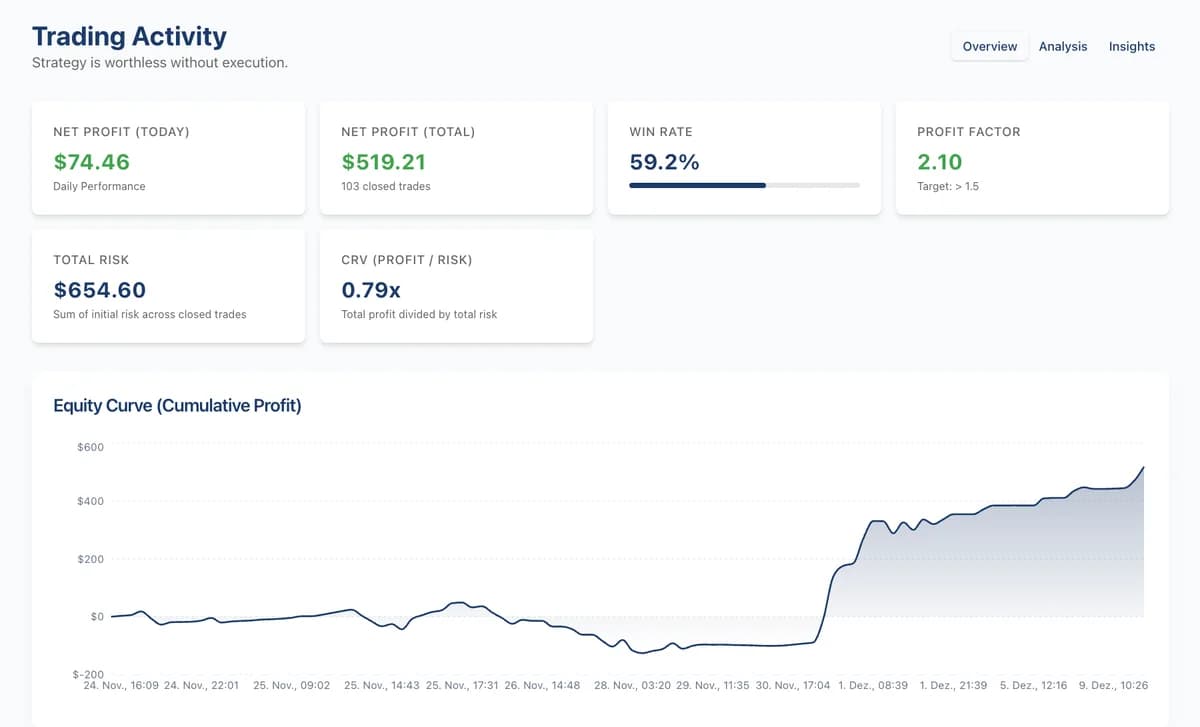
Trades placed through the EA are journaled automatically while MT5 is running
Demo account · synced from the EA| Ticket | Symbol | Type | Volume | Open time | Profit | Status |
|---|---|---|---|---|---|---|
| 547202425 | US500Cash | SELL | 7.70 | 12/09/2025, 11:08 AM | $0.00 | OPEN |
| 547137492 | GER40Cash | BUY | 0.60 | 12/09/2025, 09:29 AM | +$50.05 | CLOSED |
| 546784009 | GER40Cash | BUY | 1.00 | 12/08/2025, 06:14 PM | +$24.41 | CLOSED |
| 546767611 | ETHUSD | SELL | 0.41 | 12/08/2025, 06:00 PM | $0.00 | OPEN |
| 546597151 | US500Cash | SELL | 1.50 | 12/08/2025, 03:52 PM | −$5.58 | CLOSED |
Risk manager with a simple journal included
One invoice, one login. While MT5 is running, the EA enforces your risk rules and automatically syncs the trades you open through it to your web dashboard.
| Period | Two separate tools | ProRisk Manager PRO | You save |
|---|---|---|---|
| Monthly, first year | Two separate tools$100 + 12 × $29 = $448 | ProRisk Manager PRO12 × $35 = $420 | You save$28 |
| Yearly, first year | Two separate tools$448 | ProRisk Manager PRO$349 | You save$99 |
| Yearly, from year two | Two separate tools12 × $29 = $348 | ProRisk Manager PRO$349 | You saveabout the same |
Example calculation: a risk manager at about $100 one-time and a journal subscription at, say, $29/month. Every row assumes the journal is paid monthly. Cheaper yearly plans and free tools exist, and with them the saving can be smaller or gone. Other vendors' prices vary, and so do their features.
What the journal covers: your trades with ticket, volume and result, stats like win rate, profit factor and drawdown, an equity curve, a monthly calendar and a note on every trade. Not included: tags, screenshots and trades placed outside the EA, such as from your phone. Dedicated journal tools go further. Use the 14-day trial to see whether this is enough for you.
Every PRO feature, 14 days, no card
Everything you need to decide is on this card.
$0 today · confirm your email · ends by itself on day 14
How you set it up afterwards
- 1Confirm your email to get the .ex5 download and license key
- 2Copy the file to MQL5 › Experts, allow the license server in MT5, switch on Algo Trading
- 3Drag it onto a demo chart, enter the key, set risk % and daily limit
What happens
- TodayLicense, download, all PRO features
- Day 1–14Test on demo, dashboard included
- Day 14Trial ends by itself. No card, no charge.
- Continue$35per month$349per year · saves 17%
- New to trading. Can I still use it?
- If you can find your way around MT5, yes. Start on a demo account with practice money. It helps with the sums and your limits; you still have to learn trading yourself.
- Does it trade for me?
- No. You decide every entry. The EA works out the size, places the stop and can close at the limit.
More questions
Something missing? Write to support@proriskmanager.com.
What does an MT5 risk manager do?
It runs as an EA (Expert Advisor, an add-on program for MT5) on your chart and helps you stick to rules you set in advance: lot size from a fixed risk per trade, a stop loss, optional breakeven, and a daily loss limit that locks the panel and can close all positions. ProRisk Manager is such a risk manager. It does not trade on its own signals; you decide when to enter.
Is it suitable for beginners?
Yes, if you can find your way around MT5 and know what an order and a stop loss are. It does the lot math for you and helps you stick to a daily limit. It will not teach you trading, and you still need your own strategy. Try it on a demo account first, where you trade with practice money.
Will it make me profitable?
No tool can promise that, including this one. ProRisk Manager limits the size of your trades and helps you cap daily losses. Whether you make money depends on your decisions and the market. Losses remain possible, even beyond your limit, for example in price gaps.
Does it work with my broker?
Yes, with any MT5 broker: forex, indices, metals, crypto. The EA runs in MT5 on a computer or VPS, not in the mobile app. It can only manage positions you open through its panel.
Do I need a VPS?
The EA only works while your MT5 terminal runs. If your computer is off, nothing is being watched. To keep it running, run MT5 on a VPS, a rented computer on the internet.
Does the daily limit block manual trades in MT5?
No. At the limit the EA locks its own panel, and with auto-close it also closes all positions on the account. Orders you place directly in MT5 are not blocked; the EA can warn you about them.
How do I continue after the trial?
Upgrade in the dashboard, monthly or yearly.
Is there a free version?
There is no permanently free plan. You can test the full PRO version for 14 days without payment details, and the trial ends by itself. After that, PRO costs $35 per month or $349 per year.
Do I still need a journal tool alongside ProRisk Manager?
It depends on what you expect from a journal. While MT5 is running, the EA automatically syncs the trades you open through it to the web dashboard. Trades placed outside the EA do not appear there. You get stats, an equity curve and a calendar, and you can save a note on every trade. If that is enough, you do not need a second tool. Dedicated journal tools go further, and the 14-day trial shows you whether you need that.
Run it on demo first.
14 days of every PRO feature on a demo account with practice money. No card, nothing to cancel.